Shoutout to the Intigriti team for selecting this article as one of the winners for the writeup contest! Thank you!
Intigriti Writeup - 0526
This is a writeup for the monthly CTF hosted by Intigriti for May 2026. It was a fun challenge, and apparently my solution was an unintended one! Let's walk through my process, and I'll put up some key takeaways at the end.
Setting the Goal
Usually with a CTF, the goal is to find a flag. However, in Intigriti's monthly CTFs, the goal is usually to "pop an alert!"
Popping an Alert
In bug bounty scenarios, popping an alert is a harmless way to demonstrate that javascript is executing in the context of the target page. A real attacker will almost certainly not use this javacsript function, as it would "alert" everyone that visits the page to their presence. They would noramlly use something like fetch() to send a post request with all of your cookies or PII to a server that they control, or inject a script tag that points to a script that they're hosting themselves to execute malicous javascript. Therefore, "popping an alert" translates to "proving that javascript can be injected into this page by an attacker and executed."
Recon
What Are We Working With?
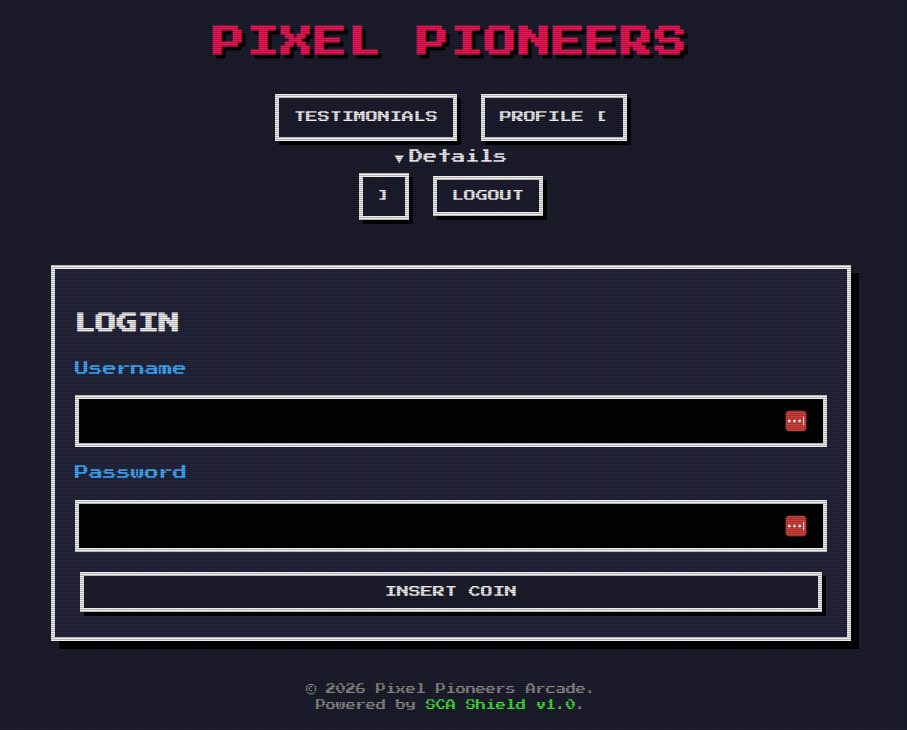
What functionality does the page have? What does it do, who can see it, what can we test? This is a very simple application that allows you to register an account with a username and password. The username field is an obvious choice for testing, but let's explore the rest of the site first.
After registering an account and logging in, we can see that the main functionality is an input box for writing testimonials, and when you submit a testimonial the page adds it to the "Community Feed" section below. There's also a function to update your username!
These Intigriti challenges are usually very lightweight, and this one was no exception! In the source of the challenge page, we can find the script that's loaded in located at /js/app.js. This is the script that performs all of the actions on the site - adding users, updating usernames, adding testimonials to the page, validating input, everything is here. With our goal of proving javascript injection, the most interesting bits to us should be the functions that update information or add things to the page.
Finding the Vulnerability
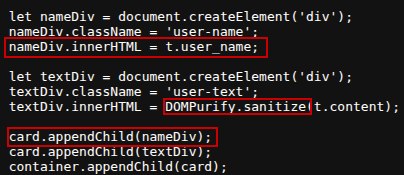
Looking through the script, we can see that the function that adds testimonials to the page adds both the username and the testimonial content to the page, but in slightly different ways. The testimonial field is passed through DOMPurify to sanitize the input and remove anything malicious, but the username is added to the page without any sanitization at all! This is a huge red flag, and we can see that the username is added to the page using innerHTML, which means that if we can inject some javascript into our username, it will be executed by the victim's browser when the testimonial is added to the page! This is because innerHTML adds our HTML content payload directly into the document.
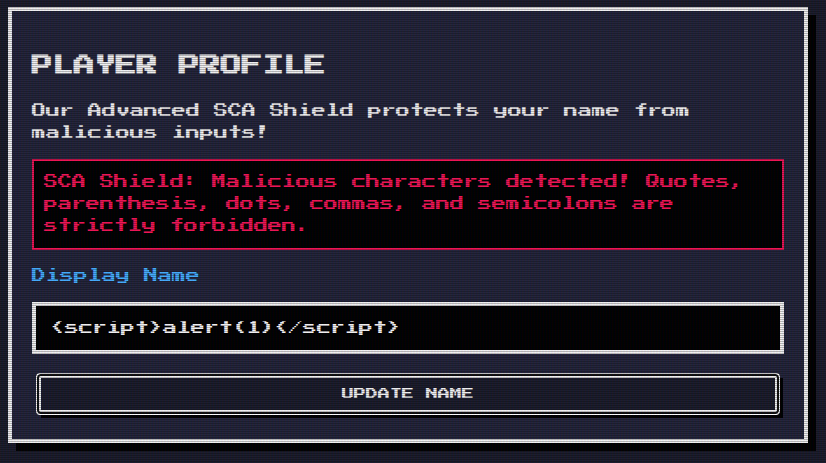
To test this out, we can try updating our username to include some harmless javascript to execute when our username is added to the page. Alert is a good one, but when we visit the page to update our username, we run into a problem. A big red error message that tell us that our input isn't valid, to be specific. But it seems that maybe it's a little too specific, since it's telling us exactly what we can't use to inject javascript.
The List
Thankfully, the overly verbose error message tells us what characters are disallowed. Removing these characters from our payload should allow us to inject our alert fucntion into the username, but the parentheses presents us with a big problem since we use those prenthesis to pass in what our message should be for our alert box.
This is where Tagged Template Literals (or template strings) come in handy. These are literals delimited with backticks and they can have both strings as well as expressions inside them, which means that they can also return React objects and other things if you denote placeholders with ${expression}. Most importantly, unlike string literals, if we prefix our template literal with a javascript function, javascript's native Tag Function support will force that method to parse our string literal without parentheses!
So we can replace the parentheses with backticks to get around our block and leave the script tag dangling to avoid the filtering on the forwardslash and our payload should be accepted! However, now we get a different message that indicates our username still has something wrong with it.
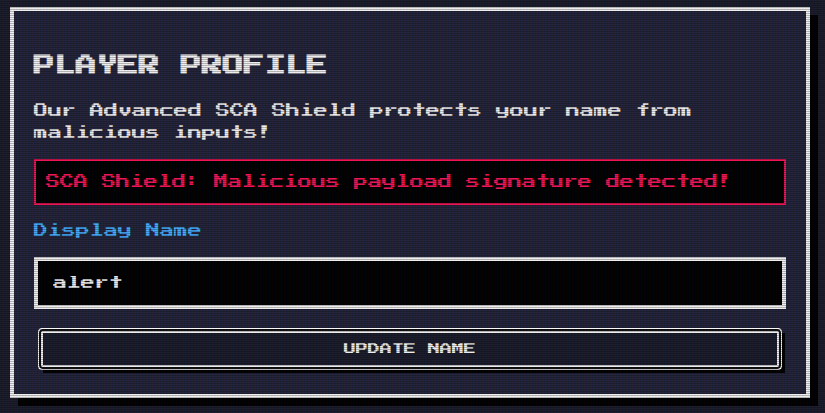
This present us with the denylist. The backend seems to be filtering out the word alert, which we can test and prove by trying to make our username just the word alert and still getting rejected. This leaves us with two options - we can try to bypass the filtering and get alert in our payload anyway, or we can find another javascriptfunction that isn't blocked that will execute without user interaction on the page. Finding another payload is the route that I picked, since it seemed easier than trying a bunch of different encodings to see what fires.
Exploiting the vulnerability
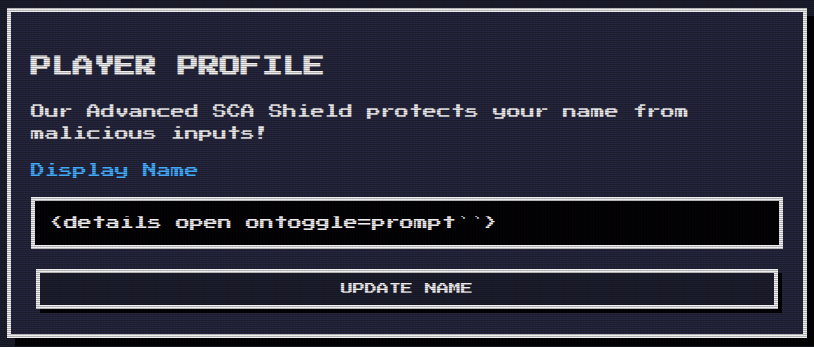
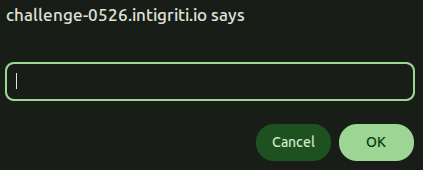
Keeping a running list of disallowed javascript and HTML keywords brought me to the "details" html tag, as the script tag is also disallowed. This tag creates a dropdown on the page that can be opened and closed by the user, and the ontoggle attribute allows us to executes javascript when it's opened or closed. This would normally be a problem, because it implies that we need user interaction on the page (clicking the details tag) to execute our javascript, but here's fun fact: The detail tag's ontoggle attribute will automatically fire upon page load if you include the open attribute! This is because when the browser reads detail open, it initializes the tag, and that first initialization is enough to execute our javascript.
Now that we have a delivery method, let's find a good payload to use. Picking some payloads that are similar to alert, we're left with prompt() and print(), and either will work. Just replace the parentheses with backticks for a final payload that looks like this: <details open ontoggle=prompt``>
Key Takeaways
For Devs
- ALWAYS validate and sanitize user input, every time
- When feasible, use allowlists instead of denylists
- Anything that can be user-controlled should be untrusted
For Pentesters and Bug Hunters
- Pay attention to verbose error messages
- Keep a running list of filtered keywords and characters when testing for injection vulnerabilities
- Template literals can be used to force javascript methods to parse input without parentheses
- Some javascript functions can trick the browser into firing upon load without user interaction when given the right attributes
Thanks for reading!